BLOG – Page 23 – Read First Chapter.com

BLOG

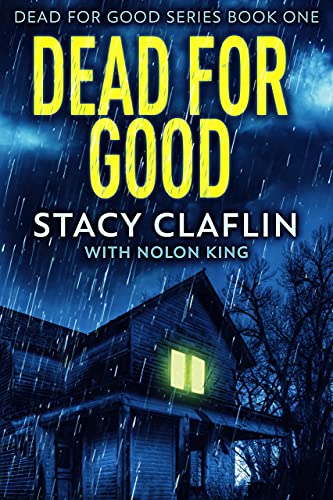
Writer’s Diary – Book Review – Dead for Good

dead-for-good-coverWHAT I LEARNED READING Dead for Good by Stacy Claflin with Nolon King:

I left a five star review as the book was well worth the read.  It was well written, the prose was good and easy to read.  This book held my interest and the action started on Page 1.

I would classify this book as a psychological thriller.  What I found most clever about the book is that all of the suspense was inside the family home, with a little help from some outside neighbors.  The plotline was very believable and it worked throughout the story.

The author/authors created characters who had a lot to do during the story but also had a lot of depth to them as well.

The only criticism I have is that the ending was not so much a twist as more of a 'out of nowhere' kind of resolution.  There was no real foreshadowing of the dual side to the culprit.  I will keep it very vague in case anyone reading this would want to read the book, which I would highly recommend.

I'm no expert on plot twists, but most of the YouTube Teachers suggest that a surprise ending needs to be foreshadowed somewhere in the story, so the reader says, ah, yes, I should have seen that.  That is the one thing I didn't really feel in this read.  I felt the true culprit kind of just popped up in the end to surprise the reader but wasn't foreshadowed in any way.

That was my only criticism.  I still gave this book a 5 star on Amazon because I believe my criticism only came from me being an author and looking for these things.  My guess from the reviews on this book is that normal readers didn't even catch the lack of foreshadowing I'm referring to here.  The character was written into the beginning of the story, and that was enough for the normal readers.

This was also a great psychological thriller without having a psychiatrist or psychologist in the plot.  The whole thing worked well within the one family.

MY FAVORITE TURN OF PHRASES:

~ We're in this together.  Always and forever.

~ People tended to only focus on the good in the deceased as if death automatically diluted the truth.

SUMMARY:

I highly recommend Dead for Good.  It gets high marks for great plot, great characters and readability.  This book's action started literally on Page 1 and kept up until the very end.  It didn't sag once.


Self-Publishing Tip – How to Add Chapter Header Graphics

START WITH A SIMPLE WORD FORMAT

I've been struggling with trying to do this for about three years!  I finally figured it out, thanks to some other YouTubers, one of which was Derek Murphy -- who knows all things when it comes to self-publishing!

I write in Scrivener and when it's time to proofread, I compile into Word and do the proofreading and editing there.  So I start with simple formatting.  This simple formatting will make adding the chapter graphics easier.  You need to trust me on this.  You will want to embed your fonts in Word also.

We will be going from DOCX to an ePub file.  So as a reminder, make sure you do your Table of Contents using the Heading 1 links.  I only have 3 pictures that I use in my books.  One is a small publishing icon, one is a small scroll I use on the Note to Readers page, and the last one is the Chapter Graphic itself.

IMPORTANT:  One more reminder to do your Table of Contents in Word using the links and Heading 1.  If you forget this, you will have to redo the entire process I'm showing you!  (Speaking from experience)

IMPORTANT:  See above.  Leave one blank before your Heading 1/ Chapter Titles.  You will thank me for this later!


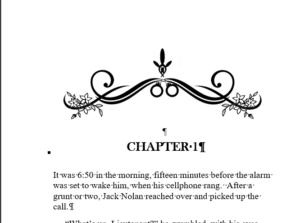
Chapter-graphic-example

IMPORTANT:  Only add one chapter header picture right before Chapter 1.  Make sure it is wrapped “top and bottom” and also aligned to center.  See above picture.

Save the document as a .DOCX file.


CONVERT TO A ePUB

I use a service called convertio.ca.  (https://convertio.co/) I believe you can use this once for free, but I pay for it as I use it all the time.  If you search for 'free ebook converter', you may find another free ebook converter.  I  used to use a Chrome extension that was similarly named, convertio or something, but it stopped working for me.  You can see if they have another one in the app store if you don’t want to pay to convert.

Go to https://convertio.co/ and upload the manuscript.docx file and choose to convert into an ebook and then choose ePub.  Then click on the convert button.  It may take a few minutes to throw up a download button.

NOTE:  During this process, your ePub will pull in all of your pictures and separate your chapters into separate files.  That’s why you only want to add the one chapter picture.  You can use the same one over and over in your document and keep the transfer cost down.

Once this is done, click on the download button.  It will most likely save to your download folder.  If you want to download it into your manuscript folder, you will need to choose that folder.   In any event, it will be downloaded onto your hard drive.


DOWNLOAD SIGIL PROGRAM - THEN OPEN IT:

ONCE IT IS DOWNLOADED, open your Sigil program.  If you don't have it yet, it's a free download.  Go to https://sigil-ebook.com/sigil/download/ and download your version.

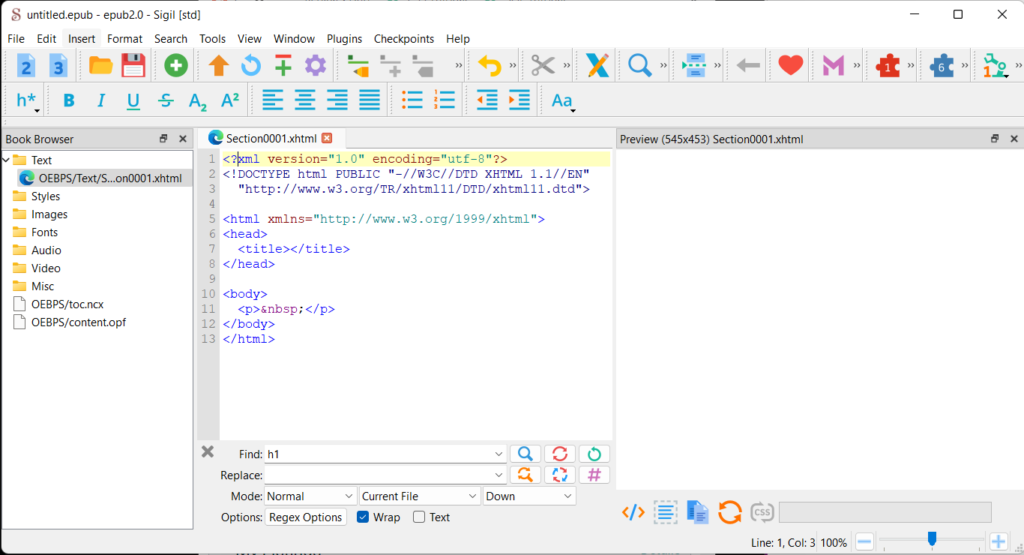
Once it's downloaded, open the program up.  When it opens up, it will be sort of blank, like above.  This is what a blank ePub document looks like.  We won't be using the blank document.

Click on File => Open => Choose your recently-downloaded manuscript.ePub file.  It will open it up in the Sigil program.

sigil open program

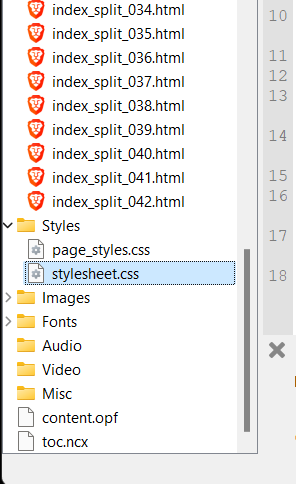
Once you open your manuscript epub file, it will pull in all of your chapters as individual html files.

Then there is a Styles folder.  We will be making changes to the individual html files, the Title pages, and the stylesheet.css.  Be sure to use the style sheet I have highlighted to the right.

Your images from your eBook will be pulled into the Images folder by the convertio process.  You will be using the one chapter header graphic over and over.  You have everything you need to begin to format the chapter titles.


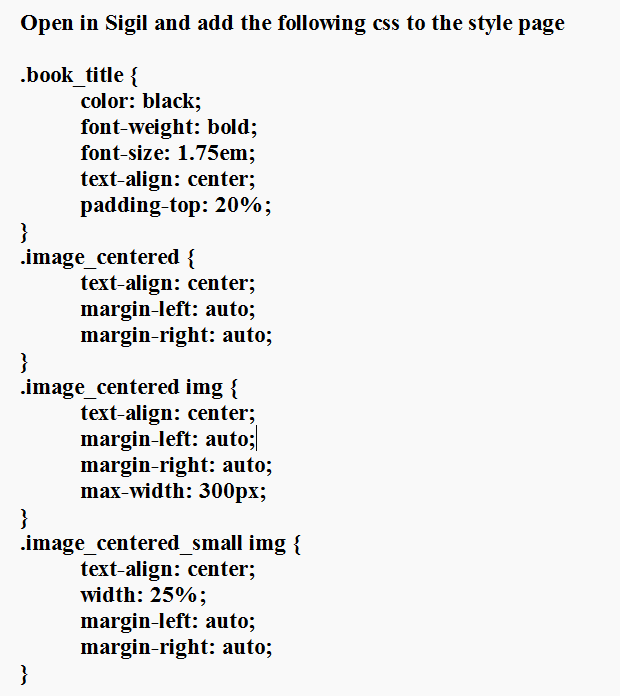
LET'S ADD THE CUSTOM STYLES:

Sigil-css-styling

You will have to type out these codes.  Each digit and space is important.  If you forget one semi-colon or bracket, the codes won't work.  So double check your work before you copy and paste into the Styles document.

DIRECTIONS:  Go to the File Listings on the left side.  Find the Styles folder and double-click on the stylesheet.css file.  When it opens, scroll all the way to the bottom of the file.

Copy and paste the above coding into the page and save.  There is a save icon on the top menu of the Sigil program.  Or you can use Control S to save.

** See below for further coding explanation

FIX THE TITLE PAGES:

Nowt that we have saved the new css codes, it's time to change the files to pull in the new coding.

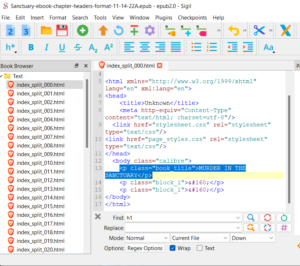
Looking at the diagram above, double click on the first file, marked index_split_000.html.  This is the first page, which is my Book Title page.  Now, even though I have coded this in Word to align to the center of the page, the ePub converter ignores this and throws my title onto the top of the page.

So I will change the class name from whatever it is (this will be auto-generated by your ePub converter) to "book_title".  (Note:  Be sure to use an underscore, not a dash)  This will then move the title down 20% from the top of the page.  I use 20% because when someone reads on a tablet in landscape, I don't want the title to disappear from the page.  By moving it only 20% down, it is still 'above the fold'.  If you don't understand this, don't sweat it.

I do the same thing on the second Title Page in my manuscript.  Make the same change to "book_title".   Changing the class name to "book_title" is the only change you need to make.


NOW WE WANT TO ADD THE CHAPTER GRAPHICS:

Sigil-book-image-coding

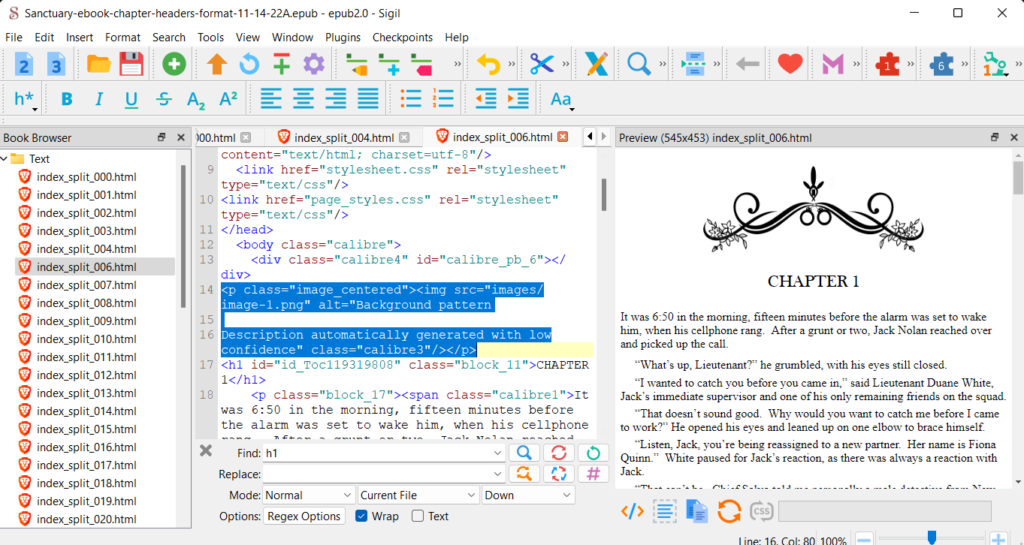
Double click on the first chapter page in the document above.  There will be auto-generated html coding referencing the picture.   If you look below, I have changed the coding to reference the class of "image_centered".  That's the only part of your coding that needs to change.

Once you have made this change, copy this to your clipboard.  (Control C).

Sigil-html-before-picture

One by one, you want to double-click each chapter to open it, and copy and paste this coding right above the CHAPTER 2, CHAPTER 3, CHAPTER 4, etc, in each file.  It will be a little time consuming, but believe me, it is MUCH EASIER than hoping and praying that you can get a converter to get the spacing and alignment right.

Once you have finished each one, you can then save your work, and email it to your Kindle account and check it on your ereader and on your cellphone.  I have had a perfect conversion using this method.

I hope I have helped you save all the frustration and hair-pulling I did in searching for a way to do this!

** FURTHER EXPLANATION:

The css codes added some alignment codes, to make sure they are centered.  The max-widths of 25% are to make sure my publisher icon is not too big, and the max width of 60% is to make sure the chapter header graphic does not come up too big.  The rest you don't really need to know, but if you are curious, you can go to W3School CSS to learn more.

These codes are used to style my chapter graphics, the book titles and the small publisher icon and another small graphic I use.  So if you are only adding the chapter headers, you will only need to add those codes.

Sign up below to get a download of a checklist on everything covered in this blog article.  Learn how to use Sigil and create an eBook.

Sign up below for the weekly newsletter.


Writer’s Diary – Book Review – A Perfect Alibi

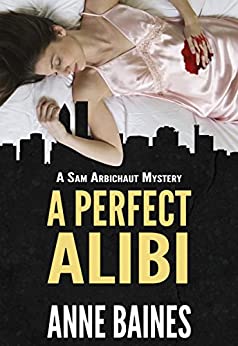
This is not so much a book review of the story written by Anne Baines, but more about what I, as an author, learned from reading it.  To me, that fits more into a Writer's Diary.  The name of the book is A Perfect Alibi, and it is Book 1 of the Sam Arbichaut Mysteries.

First of all, I enjoyed the book immensely.  Since I began to write mysteries, I no longer just read mysteries for entertainment.  My author's mind is always looking for what I can learn and use in my own writing.

I found this book to be easy to read, which I think is crucial in today's world where people are too busy to spend two pages reading a description of the trees in the field.  So the action in the book moves at a pace that keeps the reader engaged and trying to think of how the mystery will unfold.

PRIVATE INVESTIGATOR WRITING TIPS:

I also learned a few things in the book about PI techniques.  For example, PIs keep the cars running so the sound of an engine catching won't make anyone look up or draw any attention to themselves.  Pulling out after someone would make them suspicious, but a car that was already in motion wouldn't strike anyone as a potential tail.

In spite of all the scenes in movies and on TV, the identifying of a body is done today with photos.

MY FAVORITE TURN OF PHRASES:

  • plasticky smiles
  • Death was brutal and messy.  A small, contained scene like this was outside the natural order of things.
  • the sort of sleazy people who thought the worst of others because they were so lowbrow themselves
  • He knew the sorts of things they said behind their hands
  • Now he was in his late forties, he was terrified of the half-century marker he saw approaching, and he wanted to grasp at the youth that had slipped away.
  • Clint didn't have the look in his eye of someone savoring gossip.
  • Fredricks was quiet now, almost introspective.
  • It sounded like she was the sort of person who was never satisfied because she's never bothered to figure out what she really wanted in life.  It was like she was following all the rules because she thought the world owed her happiness if she did.

There were so many more great phrases used by Anne Baines.  I would recommend this book to any author focused on improving their own prose as well as any authors who want to learn about private investigator techniques.  The prose was fantastic and I have the other books in this series on my "next up" list.


Kickstarting Your Writing Career by Jessica Brody

How to Kick-start Your Writing Career After Graduation

Freelance writing is a viable career, and there are no hard-and-fast rules when getting started. You get to experiment to find out what works for you and what doesn’t. Read this helpful guide if you want to write for a living after graduation.

Mindset First

Fear is one thing that stops aspiring freelance writers from growing their businesses. First, you’ll have to build confidence and just start taking action. Don’t be afraid to make a mistake or become upset if you get rejected by a client as that’s part of the growth process.

The next step is to identify your writing niche. After all, clients don’t usually look for generic solutions for specific problems. If clients want content for real estate or finance, they most likely will hire a real estate writer or a finance writer. Focus on at least three niches to help you find good clients.

Lastly, commit to your writing goals. Do you want to be a six-figure writer this year? Reach out to clients and create an online presence. Most importantly, find ways to improve your writing skills by enrolling in online courses and reading books on writing.

Choose a Business Structure

An LLC, or limited liability company, offers personal liability protection for your writing business, more flexibility, less paperwork, and tax advantages. Each state has different regulations on forming an LLC, so check the rules first before moving forward. When establishing your LLC, avoid huge lawyer fees by using a formation service or handling the process yourself.

Set Up a Process for Invoicing

Next, set up invoicing for clients, so you receive payment promptly. An invoice helps your clients understand the breakdown of the services they’re paying for, how much is due, and when they’re expected to pay. Use an invoice generator to quickly create and download customized invoices for your clients. You can also include your business logo, text, and photos in your invoice.

Launch a Writer Website

A good website lets you show off your writing portfolio, generate leads, grow your network, and stand out from the competition. Show off your personality and leverage your experience to help you land clients. If you want your website to rank better, optimize with the right keywords. Most importantly, start a blog and promote it on social media.

How to Land Writing Gigs

Before sending out applications, ensure you have a well-written writing sample. Consider applying to content writing agencies or pitching to magazines and businesses. Some writers do cold calling and cold emailing to get clients. LinkedIn is also a good place to find prospects, but ensure your profile is highly optimized and you have good writing samples to show clients.

The secret to a successful writing business is consistency. You can attract and retain more clients if you deliver high-quality work every time.  If you can afford it, consider getting an editor to help you better polish your writing before submission. Additionally, ensure you meet client deadlines so that you’re more likely to get repeat work.

Freelance Writing Is Real

You can start your freelance writing business and earn a decent income when you follow the guide above. Choose a business structure, set up your invoicing process, design your own website, and start landing jobs. Stay consistent, confident, and committed to your goals to ensure freelance success. For writing tips and helpful resources, visit Read First Chapter.

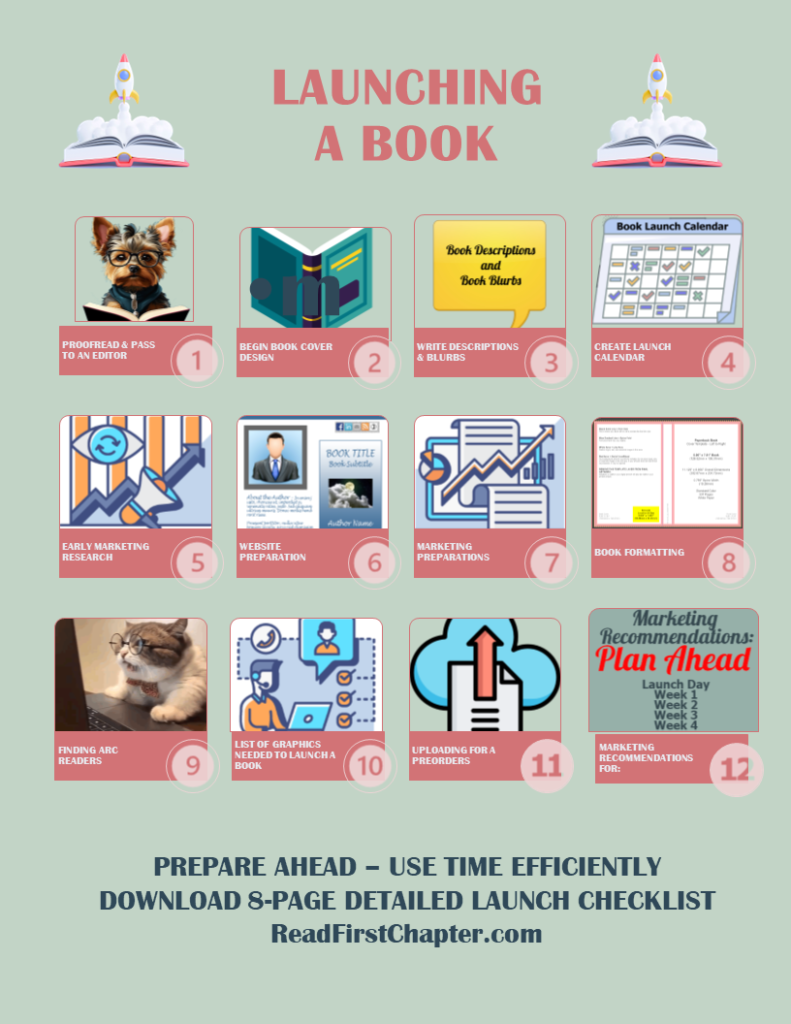
Book Launch – Early Market Research – Part 3

***    EARLY MARKET RESEARCH   ***

While your book is still being edited, you can do early market research.  Begin by going to Amazon.com and searching out your main category.  Record the names of the authors, the name of the books, and any series names.  These will come into play later on when I tell you about two YouTubers you should watch and subscribe to.

Below are two videos from these two YouTubers who really helped me the most when it came to marketing eBooks on KDP and also researching eBooks with marketing in mind.  You should watch these videos and comb their video library for other helpful advice.   The only additional thing I will mention is that I also scroll down the book pages on Amazon and notice what other categories my competition is listed in.  Write the category names down.  You will get many more categories this way as Amazon is adding new ones all the time!

PICKING THE BEST CATEGORIES FOR YOUR BOOK LAUNCH:

Below is the video from Self Publishing Titans.  He offers a free tool that I have used and it is great for picking the best categories for your eBooks.  The tool is free and it's a cinch to install.  He goes over the tool and what it can do in the video below.  I would also recommend that you subscribe to his YouTube channel as he has amazing insights and his videos are straight to the point.


I learned from Self Publishing Titans about doing my pre-launch research.  I found many more categories that I never knew existed.  By doing this early research, I was ready with my 7 keywords and 10 book categories that I would need when it came time to upload my eBook.  So have a look see at his video.

THE BEST LAUNCH STRATEGY VIDEO:

Below is a Best Book Launch Strategy video that I found amazingly helpful as a beginner.  He also has wonderful insights into how the algorithms work, etc.  Be sure to watch the video and subscribe to Dane's channel as he has a lot of great information.

This could take several days, but your eBook is with the editor anyway,  so you should have the time!

Book Launch – Writing Descriptions and Blurbs – Part 2

***    WRITE DESCRIPTIONS & BLURBS   ***

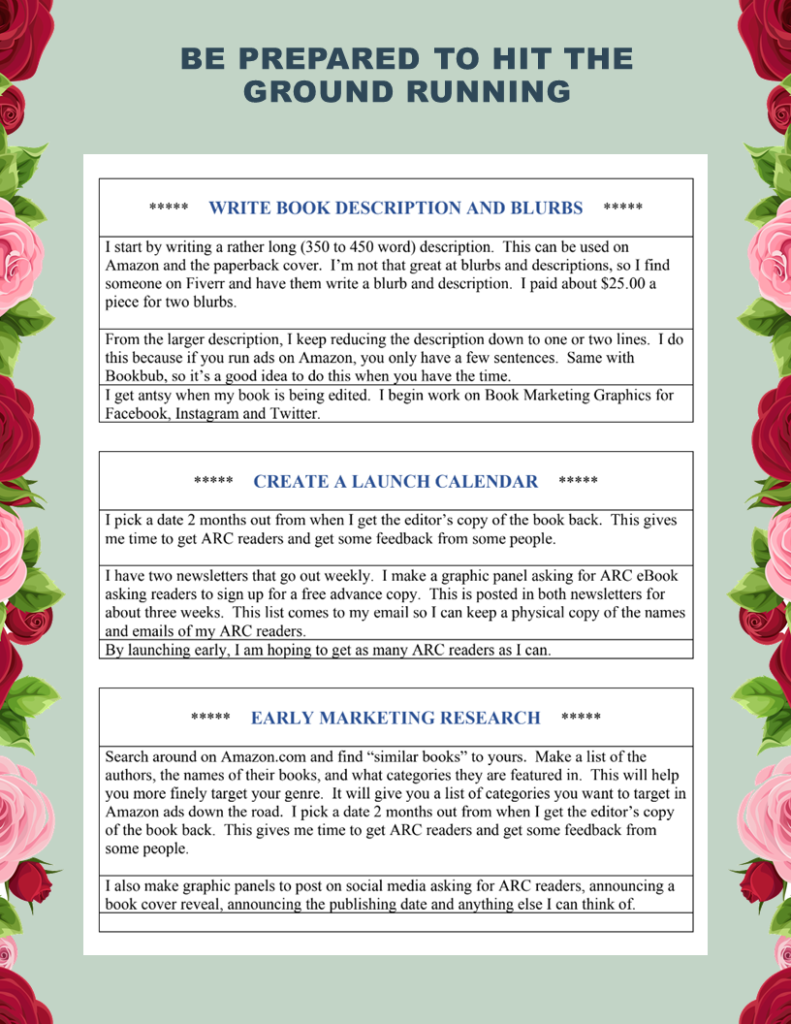
I start by writing a rather long (350 to 450 word) description.  This is good for Amazon and the paperback cover.  To be honest, I’m not that great at blurbs and descriptions, so I find someone on Fiverr and have them write a blurb and description.  I paid about $25.00 a piece for two blurbs.
From the larger description, I keep reducing the description down to one or two lines.  I do this because if you run ads on Amazon, you only have a couple of sentences.  Same with Bookbub and some other websites.  So it’s a good idea to do this when you have the time.  I get antsy when my book is being edited so this is a good way to spend my time!

I also begin work on 3 new possible stories for new novels to get my juices going.

***   CREATE A LAUNCH CALENDAR   ***

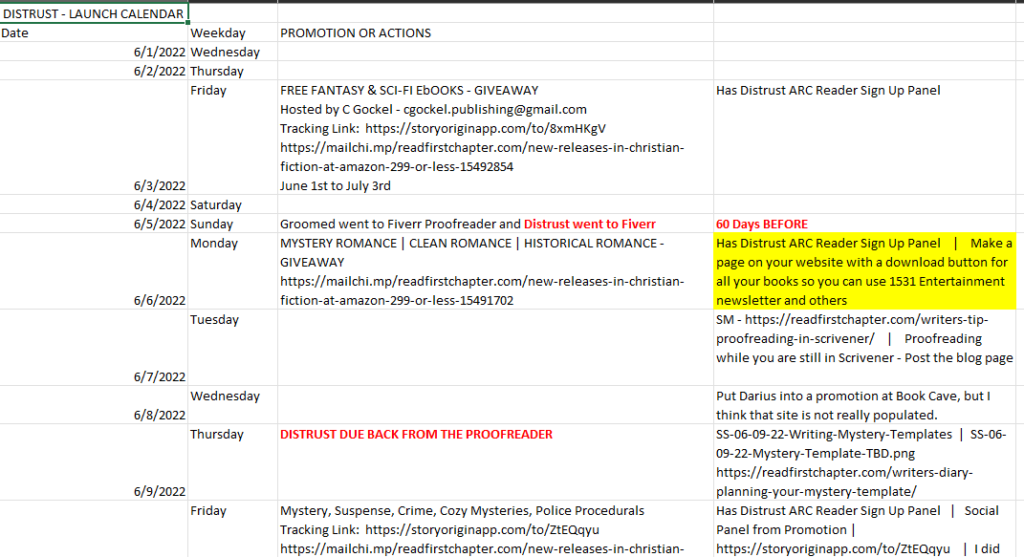
I don't pick a launch date until my book is back from the editor and ready to upload.  I prefer stress-free writing and launching, so I wait until I'm ready to go.   Once the book is done, I pick a date 2 months away.  This gives me a chance to get Advance Review Readers and some feedback from at least some people.

book-launch-calendar

You can create a separate Google calendar for this.  I use an Excel sheet, as shown above, and fill in the dates and what is going on at that time.  This allows me to keep adding and removing things.

Book Launch – From Proofreading to Editor – Part 1

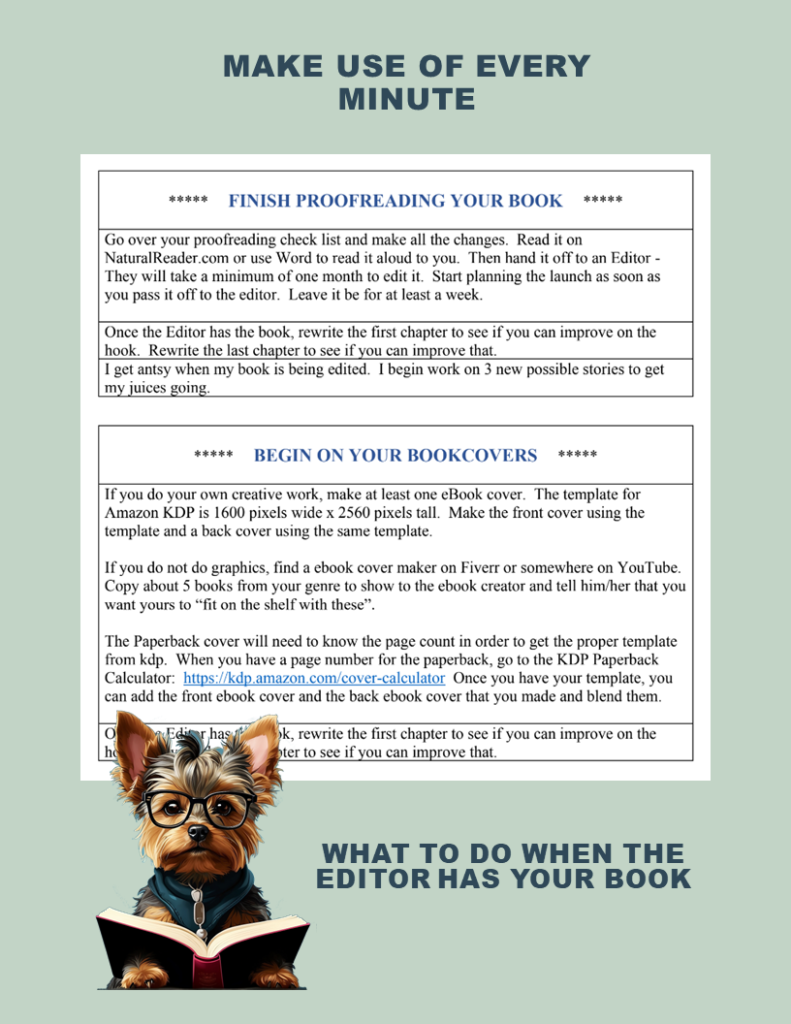
***    FROM PROOFREADING TO EDITOR    ***

Book-Launch-Front-page

Go over your proofreading check list and make all the changes.  Read it on NaturalReader.com or use Microsoft Word to read it aloud to yourself.  Then hand it off to an Editor.   They will take a minimum of one month to do a line edit.

Once the Editor has the book, I usually rewrite the first chapter to see if I can improve upon it.  And often, I do the same for the last chapter.

***   BEGIN ON YOUR BOOKCOVERS   ***

If you do your own creative work, make at least one eBook cover.  The template for Amazon KDP is 1600 pixels wide x 2560 pixels tall.  Make the front cover using the template and a back cover using the same template.

If you do not do graphics, find a eBook cover maker on Fiverr or somewhere on YouTube.  Copy about 5 book covers from your genre to show to the eBook  creator.  Tell him/her that you want yours to “fit on the shelf with these”.

The Paperback cover will need to know the page count in order to get the proper template from KDP.  When you have a page number for the paperback, go to the KDP Paperback Calculator:  https://kdp.amazon.com/cover-calculator  Once you have your template, you can add the front eBook cover and the back eBook cover that you made and blend them.


Writers Tip – Initial Proofreading in Scrivener – Part 2

PROOFREADING WHILE STILL IN SCRIVENER - PART 2:

Once my novel is now in Chapters and I have proofread it while still in Scrivener, I mark each of the scenes that have exciting events, vampiric events, even humor, to make sure the story is balanced and has events and surprised all throughout the story.  Some books I read sag in the middle as everything is gearing up for a big bang at the end.
I like to sprinkle the books with enough to hold everyone's interest.  At least that's what I'm trying to do!

I will be starting  a new novel soon, and at that point, I will make a video showing this marking of the novel for a greater overview of all that is happening.

COMPILE IN SCRIVENER AND SAVE IN WORD – Name the Document "First Draft of BOOK TITLE".

PROOFREADING IS NOW DONE IN WORD:

  1. Do an initial spellcheck in word to eliminate any and all errors you may have missed in Scrivener.
  2. Search for your usual mistakes.  Below are an example of mine:
  • Awhile (a while)
  • going to (clean up verb tense)
  • it's (or its? - check)
  • draw (drawer)
  • beginning to (check for verb tense)
  • in order to (check for verb tense)
  • going to (check for verb tense)
  • starting (check for verb tense)
  • Okay (how many times it’s used)
  • Just (how many times it's used)
  • Really (How many times it's used)
  • Very (Find a better descriptive word)
  • ." said (check glitch from auto correct)
  • ." whispered (check glitch from auto correct)
  • and all ly words
  • Search all quotes to check for opening and closing quotes.
  • Word spell check and Word grammar check.


SEARCH OUT A PROFESSIONAL EDITOR:

The one thing I need to spend money on is a line editor.  I felt comfortable enough with the plot and character development in my own stories, so I limited myself to a line editor.  They go over your work looking for grammar mistakes, confusion in the story, plot holes, any glaring mistakes.

I did a hard proofread on my work before passing it off, so the editor didn't waste time correcting typos and things like this.  So the better your ebook is, the more real pointers they will do for you.

The hard proofread ends with having the eBook read back to me by the AI reader in Word (Review tab) or NaturalReader.com which is a text to voice online reader.  This is a great way to find mistakes you are reading over because you are too familiar with the work!

DURING THE EDITING PROCESS:

Put your eBook away for a week.  This will allow your mind to refresh for the work that's ahead.  If you will be doing Advance Review Copies for your launch, get prepared to find Review readers.

I found two professional Beta Readers and Proofreaders on Fiverr.  They read the book, found several typos and punctuation mistakes, and gave me amazing feedback.

Other Text to Voice tools:  Grammerly, Ginger, PaperRater, Reverso Speller, NounPlus, After the Deadline

CLICK HERE TO DOWNLOAD A CHEAT SHEET WITH THIS INFO:


Writers Tip – Initial Proofreading in Scrivener – Part 1

PROOFREADING WHILE STILL IN SCRIVENER:

There are two levels of proofreading.  The first level is proofreading for plot context to make sure the novel is complete.  Before I leave Scrivener, I go over the different chapters and scenes and mark the following beats and make sure that everything is included.
Before I post the checklist, I need to say that I did not invent these ideas below.  I have been listening to videos by other authors for several years now and I have taken copious notes and somewhere along the way I took a little from one author and a little from another.   I think them all for their generosity in sharing their experience and knowhow.

  1. Proofread and make sure you indicate where the following items are
    a. The Hook  - This is the thing or the event that will hook the reader's interest.
    b. The Setup - This includes the setting where the story will take place.  It also includes an introduction to the main protagonist/hero and what his or her wants or needs are in life, so to speak.  This is the starting point of the quest.  (The Quest)
    c. Identify the subplot.  Be clear on how the subplot affects the plot.
    d. Inciting incident - This is the point where the story has it's first twist or turn.  The Hero is pulled into a quest that he starts out not really wanting to go on.  This is going in a different direction than "the setting".
    e. Setback(s):  Depending upon what type of novel you are writing, you will have one or more setbacks that create conflict and drama that move the story forward.  You may want to clearly mark these as well.
    f.  Major setback:  about 75% of the way through the book, the big setback happens when things look like they are not going to work out.
    g. The final battle/The Climax - In high suspense novels, this can be a physical battle for life and death.  In a less dramatic story, this is where the hero has to conquer himself or herself in order to be able to pull off their quest.
    h. All is lost - Right before the Hero gets their second wind and has a breakthrough, they will have a moment of despair where all will seem lost.
    i. The glorious/surprise ending - Hero wins/gets what they want
    j. The aftermath - 99% point of the story - This is where the story wraps up and you see the "new normal" now that the hero has broken through their fears and saved things.
  2.  Check the following about the subplot:
    k. "Subplot Development" - any crisis, suspense, etc.
    l. Any plot twists or pathway turns for the subplot
    m. Point out where subplot reaches high tension
    n. Point out where the subplot is setback or fails, or feels at a standstill
    o. Scene that resolves the whole story
  3. Make a document to check your background and descriptions
    p. Make sure you don't repeat information in multiple places.  Make a separate sheet and record which chapters your descriptions and background info is at.  This way you can make sure you have included everything and also make sure you haven't repeated anything.
    q. For the series books, make sure you include enough background
    for it to be a stand-alone book.

CLICK HERE TO DOWNLOAD A CHEAT SHEET WITH THIS INFO:


Writers Tip – Keeping Track of Background Info

DON'T TRUST ONLY YOUR MEMORY:

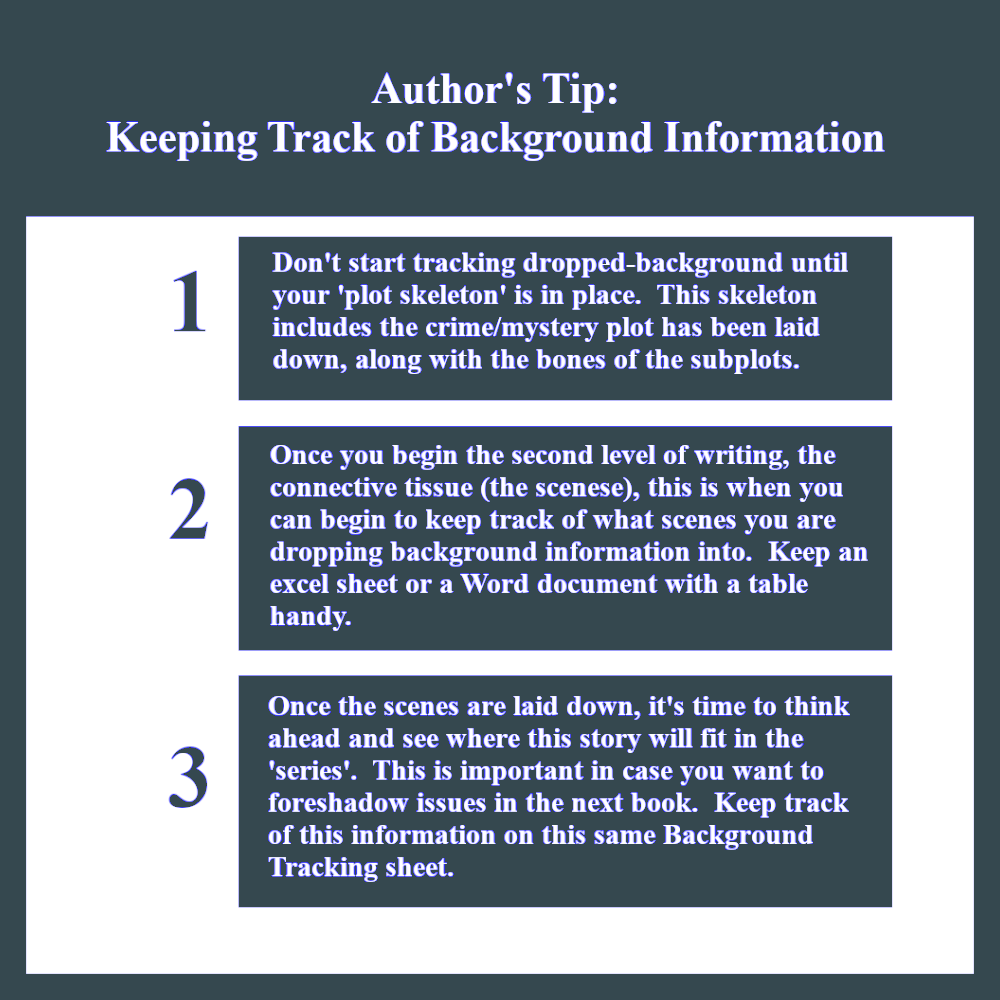
Authors-Tip-tracking-background-info

Reading through the first draft of my first novel, I realized that I had repeated background information up to three times!  I had no idea I was doing this until I was already done writing the draft.  Although Scrivener, which is a software tool for authors, has lots of tips, tricks and gadgets that are designed to help authors in every stage of writing, there was no way to check background info that was designed into the software.

What I learned the hard way was that I cannot trust  my memory on what information I have written into the story.  After my 8th novel, I have now devised a strategy that helps me eliminate that problem and am passing it on.

I make up a separate document inside scrivener where I track this background and descriptive information.  Or if you are old school, you can write a list in pen and paper keeping track of the information as you add it into the book.


HOW I KEEP TRACK OF BACKGROUND INFORMATION:

Technique 1:  Keep Track of Background and Descriptions As You Write:

The first one is to keep a separate document with a table containing 2 columns.  The left column has a notation regarding the background information or character description.  The right column, I put in what chapter I have that information in.

TABLE DOCUMENT EXAMPLE:

Background & Descriptions Chapter Number
Physical description of Hero Chapter 1
Description of job history Chapter 4
Reference to past case (for series info) Chapter 10

The only drawback to this technique is interrupting the creative process.  I was stopping while writing to record the background info, etc.  I did this for a while, but that's when I found Technique 2 which I describe below.  That one worked better for me.  You can pick which one you would like better.

Because I work with a plot outline, I write the entire story going from scene to scene to scene in Scrivener.  I write using Day 1, Day 2, etc. instead of Chapters.  This allows me to carefully watch my storyline and timeline together.   Like I said above, I write the first draft and never look back.  (You see how I like to repeat things!)  I only re-read in order to "get my bearings" between writing sessions.

Technique 2:  Begin Tracking Background after first Draft:

I stopped interrupting myself during the draft writing stage and paid no real mind to the background and descriptions.  I added them as I was writing and kept moving.  Then, after the draft is done, I shift into reading for context, to make sure the story is all there and all the dots connect.

This is the point where I begin tracking and checking on the background and descriptive info.  This is the point where I made the table document and begin tracking the background and descriptions.  If I have repeated something -- and I always do -- I remove it in one of the chapters.

This way, you can keep track of all of the background and other crucial info that you need to track.  By putting it off until after the draft is finished, you prevent yourself from having to stop the creative writing process.

This is the technique I use now all the time.  I wait until I've even set up with Chapters and I'm reading for context.  That's where I start checking on the descriptions and background info and anything else I want to keep my eye out for.  Any repetition comes out easily in this stage.

WRITING A SERIES BACKGROUND:

This same technique works with writing a series.  I write each book as a stand-alone as well as being a numbered book in the series.  This means I have to include background information as well as series information in each of the novels, without spoiling the surprise if they read the novels out of order.  Some surprises can't be helped, but some can be hidden.

I make a list of all of the facts and background information the reader of Book 4 would need to read the stand-alone in context.  I print out this list and as I begin to read through the novel for context (after the draft is done), that's when I check off and make sure all of the needed information has been included throughout the book.