
BLOG – Page 25 – Read First Chapter.com

BLOG

Author’s Tips – Plotting with Freemind

ALL AUTHORS NEED A PLOTLINE:

Each new book requires a new plotline.  I used to come up with a plotline and go with it.  But I noticed I had a lot of insecurities as to whether it was good enough or whether I was choosing a plotline too soon.

By the third book, I started to write four potential plotlines from the beginning.  Each one was good enough.  They all had a crime or a mystery, they had suspense and even a satisfying or surprise ending.  By writing four plotlines, at some point, the one plotline that I "should be writing" clings to me and I to it.  I know instinctively that 'this is the one'.

HOW TO QUIET WRITING INSECURITIES:

When I had only the one plotline, I still had an insecurity as I began to write.  What I found with starting with four is that I know I worked on all four and I know I'm writing the best one I came up with.  I feel like the plotline I chose wants to be written.  The characters are already coming alive before I even finish the plotline.

It's more work to start with four plotlines, but the satisfaction of knowing I'm writing the right book, and being able to let go of any self-doubt and insecurity, it's well worth it.

THE TECHNIQUE OF OUR PLOTS WORKED, BUT I GOT SCATTERED!

So I could tell the four plotlines was a working strategy going forward.  The first time I did this, I opened a new Notepad document, plotted a crime and a potential storyline.   When I finished, I named it the first potential plotline and filed it.  Rinse and repeat.  Sounds pretty straight forward, right?

Well, after I chose the one potential storyline, I went on to write the book.  The technique worked but, as usual, I got scattered pretty soon thereafter.  What do I mean?  I mean I couldn't remember where I filed each plotline.  Did I put it into my blogging folder?  Was it in the last book folder?  Was it filed as a general document in my website folder?  I couldn't find them no matter what.

I don't know if everyone is like this, but as soon as I have more than three pages of anything, I start going upside down if I don't have a "system" to keep myself organized.


ALL IN ONE DOCUMENT?

Then in response to getting scattered, I just wrote all four plotlines in one document, but then I was overwhelmed by how long the document was and it wasn't easy to see which plotline I was in.  The Notepad has a tendency to return to the top when you flip out of it to check a spelling or anything.  Ugh, I again went upside down.

FREEMIND - The solution:

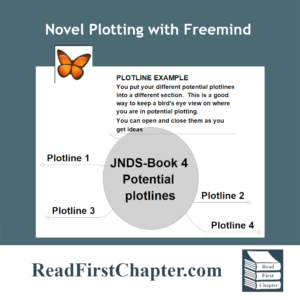
Then I found Freemind.  Of course I saw it on YouTube, where I learn all of my author tricks and tips.  Freemind allows me to keep all four plotlines on the same 'board'.  BUT I can close each one and it is very easy to determine which plotline I'm on.  This is also a way where I can scan over all past plotlines to get ideas when it's time for the next book.

This was a game changer for me, which is why I pass this on to other new authors -- or just authors who go upside down like I do!

I made a very short video on YouTube showing how this works.  Most of the FreeMind is intuitive and self-explanation when you begin to use it, but it's always helpful to just see it in action.


Writer’s Diary – Creative Energy vs. Mundane Chore Energy

What's the Difference between these different types of Energy?

Since I began writing full time, I've noticed a difference between the type of energy writing fiction takes.  Because I'm using creative energy, there's risk involved.  It requires me to make decisions and choose to go down one avenue of story and not another.  There's always a possibility that I may wind up in a dead-end or wish I had chosen another route.  No one likes disappointment, especially the type where you look back and see hours and hours of wasted writing time!

When I write, I need fresh energy, a feeling of having a full well of creative spark, almost an excitement.  I even feel more self-trusting when I'm in this state.  I'm committed to allowing myself to create.  This happens for me right after sleep.  That means the mornings -- or after a nap in the late afternoon.

If I've had a sleepless night, or have been running from pillar to post for three days in a row, I'm creatively useless.  If I try to force myself to write in this state, I never produce my best work.  I also can't write if I'm exhausted, or feeling ill, if I feel despondent about the state of the world right now, or if I'm scattered because of too many things going on at once.  Can anyone else relate?

How Does This Affect Writing a Novel?

Over time, I have come to accept this in myself.  I allow the type of energy I have dictate whether I do creative work or mundane chores.  I can do mundane house chores while half sleeping.  I can clean when feeling ill.  I can do laundry and even cooking if I'm not feeling that great.  And I do.

Once I know I'm kind of creatively useless, I shift into mundane-chore mode.  This is the time I do all my mundane chores.  But I've also found that there are even mundane chores in the production of a book, especially if you are a self-publisher.  For example:  I won't even try to design a book cover, but I can collect inspirational photos into a folder so I have them ready the next morning when I'm refreshed and have more of a creative flow.

Other mundane chores involved in the Self-Publishing world are:

  • Research in writing, publishing, social media marketing, KDP ads, etc.
  • Education - Watching videos on subjects that you need to know as a self-publisher.  This is a great way to harness mundane energy and make it work for you.
  • Checking through drafts to make sure you have start-and-end quote marks.  This is definitely a mundane chore, but has to be done!
  • Listening to your work:  Microsoft Word has a "read aloud" feature so when you're too tired to write, you can listen to your chapters being read back to you.  This is a great way to find those errors in your writing that you can too easily gloss over when you're the author.

Wrestling with the Force of Energy Never Works For Me:

female hands writing on laptot, close up

I see YouTube videos and blog articles by authors who set out very strict writing time schedules for themselves.  They don't seem to have trouble following these tight and rigid schedules.  I can't operate within that system.  I gave up wrestling with my energy a while ago.  But I believe I have found a way to make this work for me, not against me.  I see my new techniques as respecting my limitations and also harnessing my different energies to work for the same goal.

Learn to Harness The Different Types of Energy:

It all begins in analyzing your own energy levels, and how they play out in your own life.  Maybe you have a baby that takes all of your energy during the day.  Your time to be creative may be at night.  But maybe you can take advantage of his/her nap time to do some of the DIY Publishing mundane chores or research or education.

Once you get a read on how your own energy ebbs and flows, you can more effectively plan on how to shift between these states and harness them both to work for the same goals.

I hope this article helps, especially those just beginning their writing journey.


Scrivener Tip – Long and Short Lists of Keyboard Shortcuts

Long List of Scrivener Keyboard Shortcuts:

I made the four-page list of Scrivener shortcuts into a gif to give you an idea of how many keyboard shortcuts there are.  Why make lists of them?  These came in handy for me because until I made my own theme in Scrivener, I had to strain to see a lot.  The default coloring of Scrivener is so white and bright that it made seeing the gray fonts very hard -- at least on my aging eyes!

We each have our own methods of doing things, and only a few of these shortcuts may become your favorites.  But it will come in handy as you get more and more productive as a writer.  Which will happen.  The one thing Scrivener does is streamline writing and allow you to power focus on your project.

Below is a moving gif to give you an idea of what the list looks like.  I got this information from a website called How to Scrivener.  I don't have to tell you this is only one of the many resources he has for Scrivener users.


HOW TO USE THE SCRIVENER LIST:

I simply copied and pasted them into a Word document and printed it out.  I keep it on my right hand side and one by one, I just chose a new shortcut to focus on that session.  Little by little, they became natural.  I no longer need to refer to the list anymore.

PASSING IT ON:

I'm passing this on to new authors as so many other authors passed on their tips and tricks to me.  I hope this helps someone.

In case you don't want to copy and past your own document, you can click below to print out my copy.  Be sure to visit How to Scrivener to see all of the various resources he/she has for Scrivener users.

DOWNLOAD KEYBOARD SHORTCUT LIST


Author’s Resources – HTML and CSS Cheat Sheets

WHERE CAN I FIND THESE CHEAT SHEETS?

WHY WOULD AN AUTHOR OR WRITER NEED THESE WEBSITE CODING SHEETS?

If you're an writer or fiction author and you either have or plan to have a website, it's only a matter of time before you will need to know at least a little about HTML which controls the structure of a website or CSS which controls the style of a website.

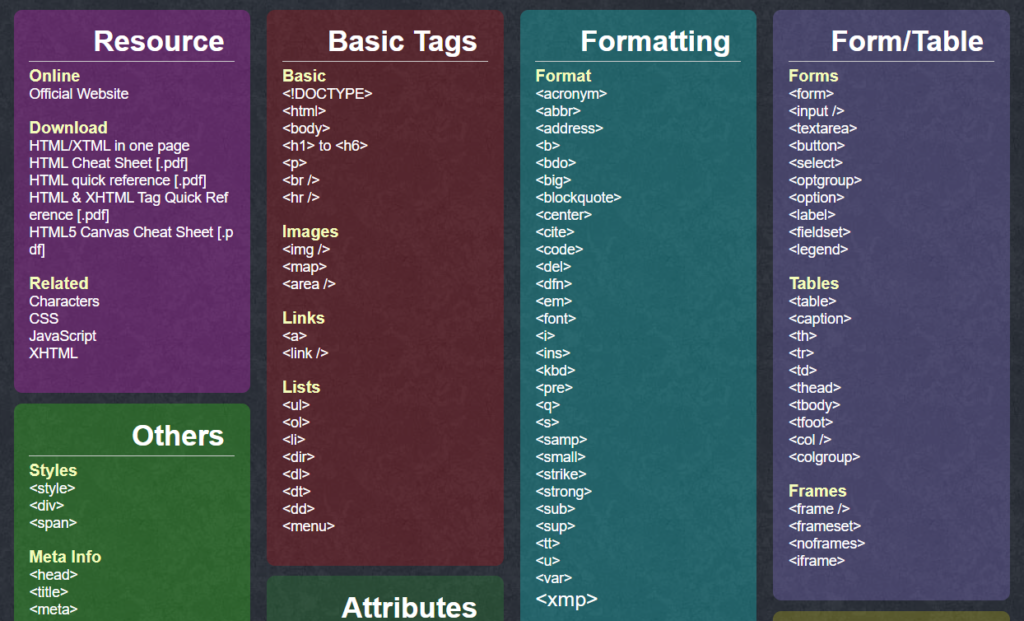
This website, overapi.com, has AMAZING Cheat Sheets for these languages as well as many others!

Just look at how much work went into theses!

Above is only the HTML Cheat Sheet. This is only a screen shot.  The sheet goes all the way down the page.  The only coding you will need are at the top.  I remember wanting to change a background color, or change the size of a headline, or add more or less margin or padding space and these came in so handy.

You will only need one to three sections on each of the cheat sheets to have everything at your fingertips.

This resource came in so handy when I put up my first website.  I hope it will come in handy to new writers and authors who 'need to tweak' just like i did.


What happened during the Carolingian Renaissance?

Changes During the Late 8th and 9th Centuries:

The Carolingian Renaissance was a period of cultural revival in Europe during the late 8th and 9th centuries. It was led by Charlemagne, the King of the Franks and Holy Roman Emperor, who sought to revive the learning and culture of the Roman Empire.

During the Carolingian Renaissance, there was a renewed interest in classical literature, philosophy, and science. Manuscripts were copied and preserved, usually by monks, and new schools were founded.

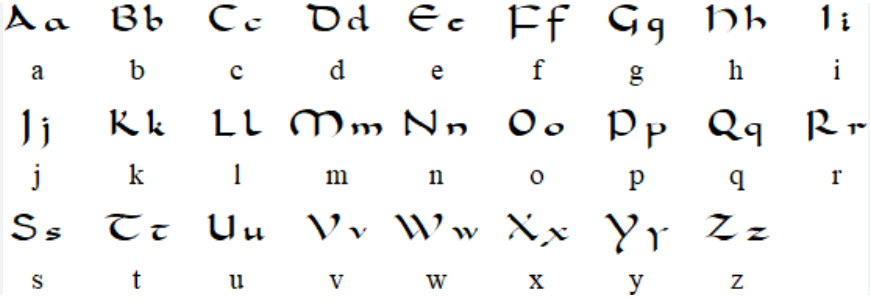
Carolingian minuscule or Caroline minuscule is a script which developed as a calligraphic standard in the medieval European period so that the Latin alphabet of Jerome's Vulgate Bible could be easily recognized by the literate class from one region to another. It is thought to have originated before AD 778 at the scriptorium of the Benedictine monks of Corbie Abbey, about 150 km (93 mi) north of Paris, and then developed by Alcuin of York for wide use in the Carolingian Renaissance
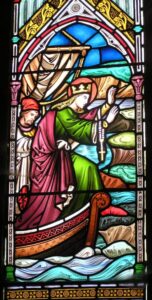
The Carolingian Renaissance also saw a flowering of art and architecture. New churches and palaces were built, and illuminated manuscripts were produced. Carolingian art was characterized by its use of geometric shapes, bright colors, and intricate designs.
The Carolingian Renaissance had a lasting impact on European culture. It helped to preserve classical knowledge and to lay the foundations for the Renaissance of the 14th and 15th centuries.

Below is a List of Specific Events During the Carolingian Renaissance:

  • Charlemagne founded the Palace School at Aachen, which became a center of learning and culture.
  • Alcuin of York, a renowned scholar, was invited to the Palace School by Charlemagne. Alcuin helped to revive classical learning and to standardize the curriculum of the schools.
  • The Carolingian minuscule script was developed during this period. This script was clear, elegant, and easy to read, and it became the standard script for manuscripts throughout Europe.
  • New churches and palaces were built in the Carolingian style. These buildings were characterized by their use of geometric shapes, bright colors, and intricate designs.
  • Illuminated manuscripts were produced during this period. These manuscripts were decorated with beautiful illustrations and calligraphy.
    Carolingian scholars translated classical works into Latin, making them more accessible to scholars and students.
  • Carolingian scholars wrote new works on a variety of subjects, including history, philosophy, and science.
  • The Carolingian Renaissance was a time of great cultural and intellectual achievement. It helped to preserve classical learning and to lay the foundations for the Renaissance of the 14th and 15th centuries.


Self-Publishing Tip – Cover sizes

Cover Sizes - Which Comes First?

I chose to write this blog post for new authors who struggle, like I did, when it comes to getting things together right before self-publishing your own books.  I managed to flip upside down when it came time to uploading and publishing.

One reason I went upside down was because I was nervous about doing something I wasn't familiar with.  The second reason was that I had done so much research that I was overwhelmed with information and I had the information in different places.  Sheer confusion.

WHAT DO YOU ABSOLUTELY NEED TO UPLOAD AN EBOOK COVER AND A PAPERBACK COVER ON KDP.AMAZON.COM?

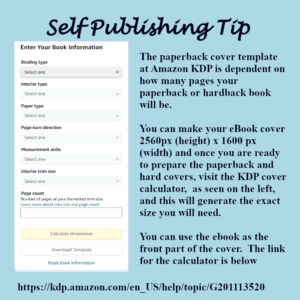
The ebook cover needs to be 2560px (height) x 1600 px (width).  The instructions say the ebook only has to be 76 dpi, but I always make sure mine are 300dpi.  It's just more high quality.  Amazon has a way of compressing them and they always look good online, so I would suggest you do the same.

It's all about the size.

76dpi, 150dpi and 300dpi - What's the difference?

The difference is size in dots per inch.  Without getting too technical, which isn't necessary, 76dpi is the most common size to use online, on websites, anywhere that you want your pictures to load fast.

150dpi is a bigger size, and that is seen sometimes online.  But that would usually be used for someone publishing actual artwork or photography.

300dpi is what a printer would need to print a color copy of anything.

72 dpi is referred to as "low resolution" and 300dpi is considered high resolution.

IMPORTANT LINKS TO KEEP HANDY:

Amazon offers a Cover Creator, but the covers are template based and it's best to learn how to use Gimp or some other free graphics program in order to make a cover.  They aren't hard to do.  Stay tuned for videos on how to easily make a cover.

The information about formatting in general begins at this link.

The paperback calculator is at this link.


WRITERS DIARY – Did I Send Draft Manuscript to the Editor Too Early?

FOLLOWING MY SYSTEM OF FIVE TO SIX REVIEWS BEFORE SENDING:

I am a diligent plotter and planner when I write.  Starting in Scrivener, I construct the story and go over it from six or seven different angles before I even compile it to be worked on, massaged and proofread in Microsoft Word.

So after this process, the book never feels rushed to me.  The last ten to twenty tweaks give me the feeling that I have finished.

IT FELT DONE - BUT WAS IT?

During the writing of my last book, Murder at the Car Wash, I had the same feeling -- that the book was done and ready to go to the editor.

I had checked it constantly to make sure there was enough background information for the book to be read alone, even though it was written as part of the Jack Nolan Detective Series.  I went over the plotline, the sub-plotlines, the balance of the story -- everything, like I always do.

BUT MY MIND IS STILL PERCOLATING

However, once the book was gone to the editor, within a few days, I seemed to have a second wind of creative energy and had more ideas of deepening the intrigue or mystery 'popping' into my head.

I know when the book comes back that I will be adding to it with these ideas that have come to me over the month the book is being edited.

Looking back, I remember the same thing happened with my first few novels.  I didn't notice it like I did this time.  Luckily, with self-publishing, you can fix something or even add something and then re-upload it!  These are the gifts of self-publishing.

WAITING 2 TO 3 WEEKS TO GIVE IT TO THE EDITOR NEXT TIME!

Thinking about this in terms of the future, I will add this 2 to 3 weeks period of allowing the book to rest unattended to see what else pops up when my mind turns to other things.  I write fast enough where this will not create a problem.

I have a list of things I check in the novels to make sure I cover everything.  I will add this "process" of waiting a few weeks to let my mind get busy with other things and then see what else my creative mind throws up as it is still percolating with the storyline.

Although this is my 1th book, I still consider myself a new author and am still learning my way through all this.

Has this ever happened to you?


Writers Tip – Writers Tools – New Book Folder Hierarchy

I'm in the process of writing my 10th novel!  I can't believe it myself.  It took me over a year to come up with one plotline to begin my first book!

This blog post about File Naming suggestions is aimed at those new authors writing their first book or maybe their second book.  When I started out, between the first draft, the arc copies, the Bookfunnel copies, and more, I very soon lost track of where my last manuscript was filed or even what I named it!

The photo above is a List of the Folders I use inside any new book file.   I'll describe below what are kept in each of the folders.  This is something I wish I had found seen several years ago when I was new!

BOOK FOLDER NAMES:

I write book series, usually 4 books per series, so my folder for a new book will be called Series 1 - Book 1 - Name of Book.  By putting "series 1" first in the name, followed by the book number, the folders will line up alphabetically and they will be kept in order.  Each series will be in order as well as all the books as well.   This helps when scanning to find a particular book manuscript or book cover, etc.


BOOK COVERS:

Book-cover-yellow-mockupI keep my book covers in a separate folder.  Inside the Book Cover folder are sub-folders named Ebook-Covers and Paperback-Covers folders.  This seems like a lot more work, but believe me, you may have four copies of one cover before you finish making all tweaks or corrections.

You also want to have a high resolution picture (300 dpi) as well as a web versions (72dpi) as you will be uploading to many different places and you want your web picture to be easily downloaded.

Keeping them separate and clearly marked also makes it easy to find the right cover when you are uploading to online book sellers like Amazon or Draft2Digital, etc.  For example, I will name one cover "Darius-eBook-Cover-72dpi" and the other one "Darius-ebook-Cover-300dpi" so I know which is high res and which is low res.

BOOK IMAGES:

I like to find pictures of actors or other people who represent the characters when I begin a new series.  I also like to find pictures of sets for the scenes to take place in.  I may also buy several royalty free photos that I may use on the book covers.  I keep these photos and any other general photos or graphics about the book in this folder.

I found this helpful to not clutter up the actual book cover folders.

PLOTLINES:

Using a Notebook document, I begin each new book with about four potential plotlines.  Then I pick one and begin to outline.  So I keep this document in it's own file.

FIRST DRAFTS:

This is where I keep the scrivener folder and where I do the majority of my creative writing.  If the storyline has a calendar that I'm following, I also keep that in this folder.  Any research that's done and any reminders to myself also go into this file.

For my first two or three books, I did work with Mindmaps in my plotting.  I no longer use them as they are too cumbersome and too hard to change.  I now just use a Notebook document and that serves me well.  But if you are using a mindmap, it's best to keep it in your First Drafts folder.


MANUSCRIPT PRE-PUBLICATION:

In the PrePublications folder, I have sub-folders.  One is "Copy to Editor" because often I choose to rewrite the beginning and end of the book a few times while the editor is working.  So I want to have an exact copy of the document passed off to the editor when it comes back with corrections, etc.

Whatever rewrites I do, I clearly mark:  "Rewrite of Chapter 1" and keep it separate.

While the editor is working, I find a few beta readers or advance feedback readers.  I keep the copies sent to them separate.  Lately, I have offered a coffee mug with the cover of the book as a small token of appreciation for the readers to answer a questionnaire.  The copy is only offered for feedback, not for a review.  One ARC/BETA copy I have been adding a link to the questionnaire for the reader to fill out.  This is a short-lived offer as once I make the corrections when the book returns from the editor, I remove this offer.

The other ARC/Beta copy is without the link to the gift and questionnaire as I participate on the BookSquirrel and other ARC copy websites.  So I don't want that offer in those copies.

At some point after editing, the book will be uploaded for giveaway to my newsletter list and uploaded to Bookfunnel and SiteOrigin for a month or so as I arrange to have a PreOrder campaign with Amazon.  So I keep those copies separate also.

MANUSCRIPT-PUBLISHED:

File-folder-manuscript-publishedAt some point, the book actually gets published!  The Final Manuscript copies are kept in this folder and they are the only documents in this folder.  I cannot tell you how many times between the editor and corrections and ARC changes, etc., that I lost sight of what my actual final copy was named and where it was!  Keeping the final manuscript in a clearly-marked separate folder eliminates this problem.

TOBEDeleted:

As you go from first draft to second draft, to editors copy, to arc copies, to any rewrites, you will wind up with copy after copy after copy.  I'm a bit paranoid about just deleting the copies I don't need anymore until the end of the project and the book is safely uploaded.  So as I save corrected copies, I put the old ones in the TOBEDeleted folder.  Then when the book is safely published on Amazon and wherever else I'm uploading, that's when I open this folder and delete everything.

INFO-BOOK NAME - BLURBS

This is a notebook sheet that I begin with the start of any new book.  First I keep any working title, or I call it Book 10, etc.  I keep a list of all of the character names, even if they are mentioned only once.  This is helpful in writing a series because you may need one police office to pass off something in Book 2 and I don't know about you, but I would never remember his name.  So by having a list of all characters named in the book, I have easy reference to every character name at all times.  I have this information sheet on every book.

Example-Info-Sheet-on-Distrust

I also keep any technical research I know I will be entering into the story.  This also makes it easy when writing your first draft.  It eliminates having to stop and try to remember where you put the research.

As you move through the process, you will gather links for your free uploads, and ASIN numbers and ISBN numbers, etc.  I add them to this document and keep them neatly arranged on this Info sheet. I also add all links to the books.  So when I'm uploading or doing any other kind of marketing, I have everything I need on this one sheet.  This saves all of that scrambling around for these little bits of info.  (I'm talking from experience!)

As you can see from the Info sheet on my last book Distrust, I have every bit of info I need, including the links, word counts, page counts, etc.

This is only the top 20% of the document.  Below are all the character names, as well as the book descriptions and blurbs.

When you begin to upload either as a giveaway or a book sale, you will also need various blurbs.  Some will requires a limitation of about 250 words.  Another website may want a short 35 work blurb, and Amazon ads require about a 12 word blurb.  So as I write and rewrite different length blurbs, I keep them on this Info sheet.  This way, I have a blurb in various lengths for any uploading or marketing that I come upon.  You won't have to reinvent the wheel every time you want to upload your book somewhere.  It also help you keep your descriptions and blurbs consistent.

I would love to know how other authors organize their books.  If you would like to have a blog post done of your filing system and tips, I would love to write it for you!